BCRYPT HASH VERIFIER TOOL
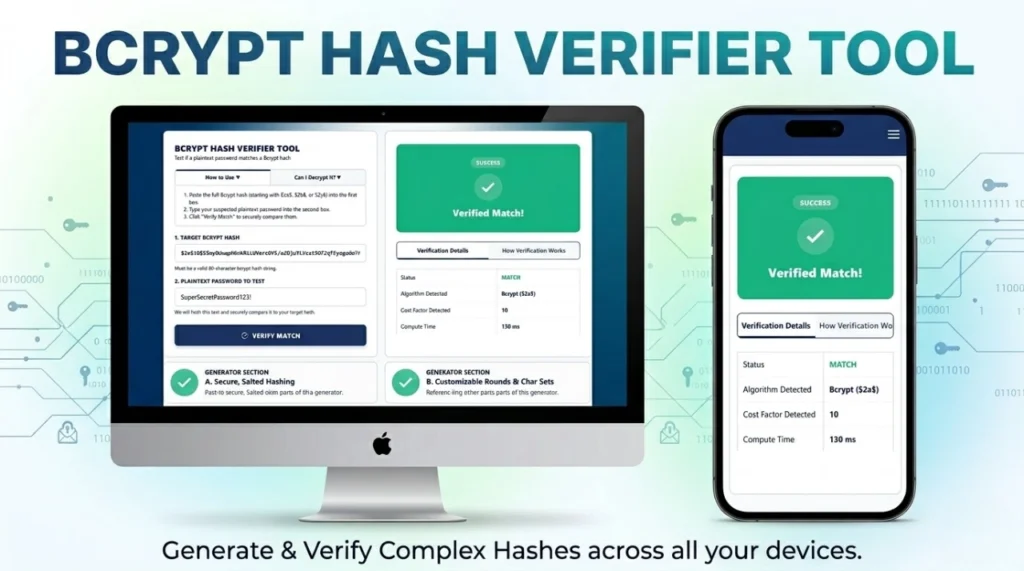
Test if a plaintext password matches a Bcrypt hash
- Paste the full Bcrypt hash (starting with $2a$, $2b$, or $2y$) into the first box.
- Type your suspected plaintext password into the second box.
- Click “Verify Match” to securely compare them.
No. Bcrypt is a one-way cryptographic hash function, not encryption. You cannot “decrypt” it back into text. You can only verify it by running a guessed password through the algorithm and comparing the result.
| Status | Pending |
| Algorithm Detected | – |
| Cost Factor Detected | – |
| Compute Time | – |
Because bcrypt is salted, you cannot simply hash the guess and compare the two strings. The verification process works like this:
- Extract the Salt and Cost Factor from the Target Hash.
- Hash your Plaintext Guess using that exact extracted Salt and Cost Factor.
- If the resulting new hash matches the Target Hash perfectly, the password is verified.
Can You Decrypt a Bcrypt Password Online?
If you are a developer or a cybersecurity enthusiast searching for a way to decrypt a bcrypt password online, you will quickly encounter a fundamental rule of modern cryptography: Bcrypt is a one-way hashing algorithm, not an encryption cipher. It cannot be decrypted.
Unlike encryption (like AES or RSA), which uses a secure key to lock and unlock data, hashing scrambles data irreversibly. The only way to reveal the original password behind a bcrypt hash is through brute-force guessing or dictionary attacks—which is exactly what our Bcrypt Verifier Tool helps developers simulate and test safely.
How to Verify a Bcrypt Password Using This Tool
Because decryption is mathematically impossible, web applications authenticate users through a process called verification. You can use the tool above to easily verify a bcrypt password online. Instead of trying to reverse the stored hash, our tool processes your new password guess and securely compares the results.
Here is the exact step-by-step logic used by developers and our tool to verify your password:
- Extraction: The system reads the stored 60-character bcrypt hash you pasted into the “Target Bcrypt Hash” box and extracts the embedded Salt (the 22-character random string) and the Cost Factor (e.g., 10 or 12 rounds).
- Re-Hashing: The tool takes the plaintext password entered in the second box and automatically hashes it using that exact same extracted Salt and Cost Factor.
- Comparison: If the newly generated hash perfectly matches the target hash, the tool will alert you that the password is correct.
If you do not have a hash yet and need to create a secure one for your database, you can use our Bcrypt Password Generator to create one.
Hashing vs. Encryption: Why Bcrypt Cannot Be Reversed
To understand why a bcrypt decryptor does not mathematically exist, you must understand the critical difference between encryption and hashing:
- Encryption is a two-way street: Data is scrambled using a secret key. If you have the key, you can instantly reverse the math and retrieve the original data.
- Hashing is a one-way blender: Data is passed through a complex mathematical algorithm that outputs a fixed-length string (the hash). Much like you cannot un-blend a smoothie to get the original fruit back, you cannot un-hash a string to get the original password.
Why Bcrypt is the Standard for Secure Password Hashing
Older algorithms like MD5 or SHA-1 are incredibly fast, allowing hackers using modern graphics cards (GPUs) to guess billions of passwords per second. Bcrypt defends against this using two main features:
| Bcrypt Feature | How It Protects Your Data | Impact on Hackers |
|---|---|---|
| Automatic Salting | Generates a random 128-bit string and attaches it to the password before hashing. | Renders “Rainbow Tables” (pre-computed lists of cracked hashes) completely useless. |
| Key Stretching (Cost Factor) | Forces the computer to run the algorithm in a massive loop (e.g., 4,096 times). | Slows down brute-force attacks to a crawl. A hacker might only be able to guess 10 passwords a second instead of a billion. |
Frequently Asked Questions (FAQs)
Is there any tool that can decrypt bcrypt hashes?
No. Any website claiming to “decrypt” bcrypt is actually just running a massive database of pre-cracked, common passwords (a rainbow table) or performing a brute-force dictionary attack. They are not reversing the math.
Is it safe to test my hashes here?
Yes. This tool operates entirely via Client-Side JavaScript. The hashing and comparison mathematics happen directly on your device’s CPU/Memory. Your hashes and passwords are never transmitted over the internet or saved to a server.
What happens if a bcrypt hash is invalid?
If the hash string is malformed, missing characters, or doesn’t follow the strict 60-character structure, the bcrypt.compare function will immediately throw an error and return a “No Match” or “Invalid Hash Format” status.
Expertise & Authoritative References (E-E-A-T)
To ensure the highest level of security, the logic behind this tool follows strict guidelines from the world’s leading cybersecurity organizations. For further reading on password storage compliance, consult these authoritative sources:
- OWASP Password Storage Cheat Sheet: The Open Web Application Security Project’s definitive guide on utilizing Bcrypt for safe credential handling.
- NIST Digital Identity Guidelines (SP 800-63B): The National Institute of Standards and Technology requirements for verifier storage and cryptographic functions.